Headless Sitefinity with Next.js: a practical guide for modern frontends
Sitefinity’s headless APIs and native Next.js support let you keep a powerful CMS backend while building a modern React frontend. With an official SDK, starter templates and hybrid rendering, you can ship headless or migrate gradually without a full rewrite.

Introduction
Modern web projects often want the best of both worlds: a strong CMS for content teams and a modern React/Next.js stack for the frontend. Sitefinity has moved firmly into that space: it ships robust headless APIs (REST and GraphQL) and native Next.js support, including an official SDK and starter templates. [source]
In this guide, we’ll look at how Sitefinity and Next.js fit together in practice: the architecture, how to get started, and how to wire up real content and widgets without guesswork.
Why Sitefinity + Next.js works well
Sitefinity DX provides:
- Headless APIs via REST/OData and GraphQL, exposed through configurable “web services” in the backend. [source]
- Native Next.js support, including a Next.js renderer and tooling for hybrid setups (some pages rendered by Next.js, others still by Sitefinity). [source]
- An official Next.js SDK (
@progress/sitefinity-nextjs-sdk) that wraps the REST API and provides widgets, typings, and helper APIs for building integrations. [source] - A Next.js samples repo with a starter template you can clone or use via
create-next-app. [source]
On the other side, Next.js gives you React, server components, SSG/ISR/SSR, and a flexible routing model that works well with Sitefinity’s page layout service and APIs. [source]
The result is a clean separation: Sitefinity manages and personalizes content; Next.js takes care of rendering, UX and performance.
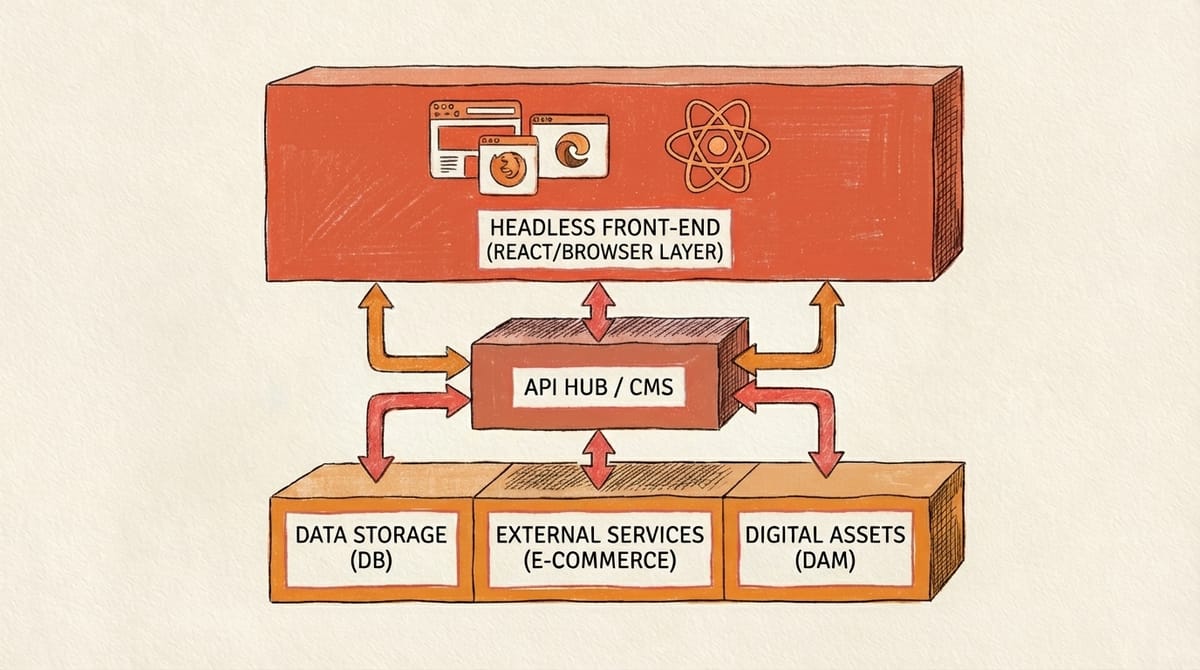
Architecture in one picture
Conceptually, a typical setup looks like this:
- Sitefinity DX
- content types, pages, taxonomies, media
- personalization, workflows
- headless APIs (REST/GraphQL, layout service)
- Next.js renderer
- uses the Sitefinity Next.js SDK
- renders pages based on layout service responses
- exposes custom API routes and widgets
- Browser / other channels
- consume the rendered pages (or JSON APIs)
Sitefinity’s docs describe this as a three-tier architecture where Sitefinity and a standalone Next.js app work together, and you can even mix “classic” pages and Next.js pages in one solution. [source]
Step 1 – Set up headless APIs in Sitefinity
Before you touch Next.js, you need your content accessible via APIs.
- In Sitefinity, go to Web services and create a new service (or use an existing one).
- Choose which content types (news, blog posts, dynamic modules, etc.) will be exposed.
- Pick the protocol: REST/OData or GraphQL. GraphQL is configured through the same UI but uses a different protocol option. [source]
This gives you API endpoints for both content delivery and management, documented per service in the backend. [source]
Step 2 – Bootstrap a Next.js project with the Sitefinity starter
Progress provides a Next.js starter template and an SDK that handle most of the plumbing:
- Create a project from the official samples repo: [source]
npx create-next-app nextjs-sitefinity \
  --example "https://github.com/Sitefinity/nextjs-samples/tree/main/src/starter-template"
- Install dependencies:
cd nextjs-sitefinity
npm install
- Configure environment variables in
.env.development(from the README):SF_CMS_URL– URL of your Sitefinity instanceSF_ACCESS_KEY– access key for your user (created in Sitefinity’s backend)
The starter already includes:
@progress/sitefinity-nextjs-sdkas a dependency- Next.js middleware that handles proxying and header rewriting for Sitefinity
- A catch-all route
src/app/[...slug]/page.tsxthat renders CMS pages via the layout service - A widget registry where you can register your own React components
At this point, you can usually run npm run dev and see Sitefinity-powered pages rendered by Next.js.
Step 3 – Rendering Sitefinity pages in Next.js
The Sitefinity Next.js SDK integrates with the page layout service: it requests layout and widget data for a given URL, then renders it via your React components. The starter template already wires this up in the app router.
A simplified version of the root page component looks like this (shrunk to avoid copying the full sample):
// app/[...slug]/page.tsx
import { initRendering, RenderPage } from '@progress/sitefinity-nextjs-sdk/widgets';
import { widgetRegistry } from '../widget-registry';

export default async function Page({ params, searchParams }: any) {
  // Initialize rendering with your registry
  initRendering(widgetRegistry);

  // Ask Sitefinity for the layout & widgets for this URL
  return RenderPage({ params, searchParams });
}
The actual starter template adds more options (like requesting related fields and error handling), but the core idea is the same: Sitefinity decides the layout and widget composition; your Next.js app decides how those widgets look.
Step 4 – Creating a custom widget (hero example)
A big advantage of the official SDK is that you can create custom widgets with:
- a React component for rendering
- an entity definition that drives the widget designer in Sitefinity
- registration in the widget registry
The “hero widget” example from EnsoDX shows exactly this pattern: a hero React component, a hero.entity.ts describing fields (title, subtitle, image, CTA button, etc.), and a registration step so editors can add this hero block from the Sitefinity page editor. [source]
Conceptually:
// app/widgets/hero/hero.tsx
import React from 'react';
import type { WidgetContext } from '@progress/sitefinity-nextjs-sdk/widgets';
import type { HeroEntity } from './hero.entity';

export async function HeroWidget(props: WidgetContext<HeroEntity>) {
  const { Title, Subtitle, BackgroundImage, CtaText, CtaUrl } = props.model.Properties;

  return (
    <section className="hero">
      <h1>{Title}</h1>
      {Subtitle && <p>{Subtitle}</p>}
      {CtaUrl && (
        <a href={CtaUrl} className="btn">
          {CtaText}
        </a>
      )}
    </section>
  );
}
The entity file and registration follow the patterns in the docs and the samples repo; once registered, the widget appears in the Sitefinity toolbox and is editable by non-developers.
Step 5 – Using the REST SDK from custom API routes
Besides layout rendering, you can call Sitefinity’s REST API directly using the REST SDK exposed by the same package:
import { RestClient } from '@progress/sitefinity-nextjs-sdk/rest-sdk';
The RestClient is a static class with methods like getItems, getItem, getNavigation, performSearch, etc., taking typed argument objects (GetAllArgs, ItemArgs, and so on).
The samples repo shows how to use this in a Next.js route handler to fetch navigation:
// app/api/navigation/route.ts
export const dynamic = 'force-dynamic';

import { NextResponse, NextRequest } from 'next/server';
import { RestClient } from '@progress/sitefinity-nextjs-sdk/rest-sdk';
import { headers } from 'next/headers';
import { initServerSideRestSdk } from '@progress/sitefinity-nextjs-sdk/rest-sdk'; // imported in the starter

export async function GET(request: NextRequest) {
  const isEdit = request.nextUrl.searchParams.get('sfaction') === 'edit';
  const siteId = request.nextUrl.searchParams.get('sf_site');
  const culture = request.nextUrl.searchParams.get('sf_culture');

  const host = (await headers()).get('host') || '';

  await initServerSideRestSdk({
    host,
    additionalFetchData: { next: { revalidate: 60 } },
    queryParams: {
      sf_culture: culture ?? '',
      sf_site: isEdit ? siteId ?? '' : '',
    },
  });

  const args: any = {
    selectionModeString: '',
    levelsToInclude: 3,
    showParentPage: false,
    selectedPages: undefined,
  };

  const items = await RestClient.getNavigation(args);

  return NextResponse.json(items);
}
This example is based on the official sample in the Next.js starter template and uses the same pattern: initialize the SDK with host, culture and site, then call RestClient.getNavigation with GetNavigationArgs.
You can use the same approach with other RestClient methods (for content lists, search, taxonomies, etc.), always following the argument shapes defined in the SDK’s TypeScript declarations.
Step 6 – Headless, hybrid, or both?
One practical question is: do you go fully headless, or do you run hybrid?
Sitefinity explicitly supports a Next.js renderer alongside “classic” pages: you can host a Next.js app that renders some pages and let Sitefinity render others, while sharing the same content repository.
That gives you three realistic options:
- Pure headless
- All public pages go through Next.js.
- Sitefinity is “just” a CMS and API layer.
- Hybrid
- New experiences (landing pages, apps, portals) use Next.js.
- Legacy sections keep their existing MVC / WebForms rendering and are whitelisted in the renderer.
- Progressive migration
- Start by moving only high-value pages to Next.js.
- Gradually migrate the rest without a big-bang rewrite.
Because the official renderer and SDK are maintained by Progress and released alongside Sitefinity, you’re not building on a random community integration.
Best practices and things to watch
A few practical tips, based on the official docs and samples:
- Model your content carefully – if you plan to reuse content across multiple frontends (web, mobile, microsites), keep content structures presentation-neutral.
- Use the SDK’s caching options – environment variables like
SF_SDK_CACHEandSF_SDK_CACHE_REVALIDATElet you control how Next.js data caching behaves for REST calls. - Secure your APIs – use access keys, HTTPS, and proper scopes; Sitefinity’s docs cover access keys and security best practices.
- Leverage widget designers – the
@progress/sitefinity-widget-designers-sdklets you define friendly designers for your custom widgets so editors get a good UX when filling in data. - Monitor performance – the diagnostics module in the SDK supports tracing REST calls and widget rendering using OpenTelemetry, which is especially useful on complex pages.
Conclusion
Headless Sitefinity with Next.js is not a theoretical pattern anymore; it’s an officially supported, well-documented setup with a maintained SDK, starter templates, and real-world examples.
- Content teams keep using Sitefinity’s familiar backend, personalization and workflows.
- Developers get a modern React/Next.js front-end stack with strong APIs and typed helpers.
- Architecture stays flexible enough to support headless, hybrid, or gradual migration.
If you’re already on Sitefinity and you’re considering a more modern frontend, the Next.js renderer and SDK are probably the most practical starting point you can pick right now.

I offer hands-on consulting to help you resolve technical challenges and improve your CMS implementations.
Get in touch if you'd like support diagnosing or upgrading your setup with confidence.